
Cooking doesn't have to be hard.
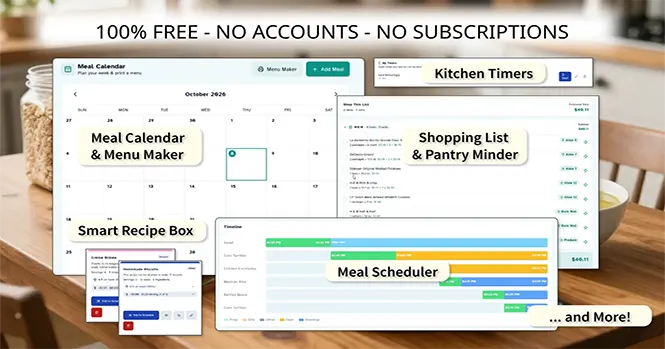
TheCookingPlanner.com is your full kitchen companion that can help to reduce the hassle of every day meal planning, grocery shopping and cooking. The integrated system manages your shopping list, pantry, recipes, meal plans, calendar and schedule all together in one convenient app.
Need to make a grocery store trip? Use the barcode scanner to create a shopping list organized by store and aisle so that you save time and effort as you shop. Enter the actual prices for your items and the Shop View will show you a real time subtotal that you can check against your receipt.
When you get home, one single click moves everything you just purchased into the barcode-scannable Pantry Minder which keeps track of your pantry inventory so you always know what's on hand, and it works seamlessly with the Shopping List, Recipe Box, and Meal Library.
Build a Recipe Box by importing recipes straight from any cooking site or make your own from scratch. The Recipe Box will check to see whether you already have the ingredients on hand, and will show you what you still need to buy, or if you have suitable substitutions on hand. It also calculates the cost per meal and serving based upon that actual prices you paid for your ingredients.
Advanced features like the Meal Scheduler allow you to plan multi-dish dinners with visual timelines, automatic conflict detection, audio and voice cues, and smart scheduling.
Optionally connect the app to your Dropbox account for cloud sync so you can pick up where you left off on any device. Everything runs in your browser, lives on your device by default, and never requires account or subscription at TheCookingPlanner.com.
Everything managed in one place on your device in one convenient app that respects your privacy.
Features
Shopping Lists
Generate shopping lists automatically from your meal plans. Missing ingredients are flagged and added to your list. Organize items by store section, check them off as you shop, and carry your list on your phone.
- Auto-generation from meal plans
- Store aisle organization
- Check-off support for grocery trips
- Merge with existing pantry gaps
- Shop View calculates your subtotal, and helps you save time by organizing items by aisle or department
- Keep separate shopping lists by store.
- Quick edit lets you change quantities and prices on-the-fly
- One-click transfer of purchased items to your pantry inventory
Pantry Minder
Keep track of what you have on hand. Add ingredients manually or use your camera to scan barcodes for instant item lookup. Set expiration dates, track quantities, and never wonder again whether you have enough pasta for tonight.
- Barcode scanning support via camera
- Expiration date tracking
- Quantity and unit management
- Storage location tracking
Ingredient Swap Finder
Out of an ingredient, or never heard of the one a recipe calls for? The Swap Finder searches a reference table of ingredient swaps and tells you what can stand in, how much to use, and whether you already have the stand-in in your pantry.
- Search any ingredient and get swaps in both directions — what can take its place, and what it can be swapped into
- Don't know the exact name? Browse swaps by category (Dairy / Eggs, Fats / Oils, Thickeners / Flours, Leavening, Spice Blends and more)
- Every swap gives the amount or ratio to use and a note on how to use it
- Where a stand-in doesn't cover everything the original does, the row says which parts it misses
- Checked against your pantry as you read: the badge that says every part is in the pantry means you can cook it now — and a badge that names a part is exactly what's still missing
- The same table answers inside your recipes: a missing ingredient on a recipe card comes back with what you can swap in, and what you'd still need to buy to make a blend
Recipe Box
Build a personal recipe collection right in your browser. Save recipes from any URL with one click — our importer extracts recipe data automatically. Organize with categories, search by name or ingredient, and pull recipes directly into your meal plan.
- One-click recipe import from any cooking website
- Custom categories for organization
- Full-text search across your collection
- Direct integration with the meal scheduler
- Direct integration with the Pantry Minder: on-hand ingredients are checked against your pantry, and costs are calculated from what you actually have
- When an ingredient comes back missing, the card names the stand-ins you already have — same swap table, with the ratio and what each one gives up
Meal Scheduler
Plan your entire meal with forward scheduling (start now, finish when ready) or reverse planning (work backward from dinner time). Our engine detects oven temperature conflicts, visualizes every dish on a Gantt chart timeline, and flags prep work that overlaps with active cooking.
- Forward and reverse meal planning
- Automatic oven temperature conflict detection
- Visual Gantt chart timelines for every dish
- Smart scheduling heuristics that optimize cook time overlap
- Voice alerts and alarms keep you on schedule
Meal Calendar + Printable Menu
Once your meals are in the library, lay the whole month out at a glance. Drop any saved meal onto a date, shuffle it as your week shifts, and send it back to the scheduler when it's time to cook. When the week is set, generate a clean, printable menu — pick a title like Dinner Menu or Holiday Menu — and hand the plan to everyone at the table.
- Plan saved meals on a monthly grid
- Drop a library meal onto any date with one click
- Send any scheduled meal straight back to the scheduler
- Build a printable menu for any date range
- Choose a menu title — Dinner, Brunch, Holiday, Birthday & more
- Pick a print layout: a clean menu or a more decorated one
- Edit, move, or remove entries as your week changes
Meal Library
Never build the same meal plan from scratch twice. Save any finished schedule to your library and bring it back in one click — every dish, prep step, and cook block comes with it. Load it to cook, refine it for a new week, or place it straight onto the calendar.
- Save a complete meal plan with one click
- Reload any saved meal into the scheduler as a working copy
- Edit a saved meal in the scheduler
- Schedule library meals onto the Meal Calendar
- Preview a meal's dishes and timing before loading it
- Delete meals (and their calendar entries) with a clear confirmation
Articles
Access helpful articles on various cooking related topics such as:
- Kitchen Safety
- Kitchen Tips
- Meal planning
- Recipes
- and more
Kitchen Timers
Manage all of your cooking timers in one unified interface
- Meal schedule timers
- Your commonly used Timers
Optional Cloud Sync
Access your recipes, pantry, and meal plans from any device. Our encrypted cloud sync keeps everything up to date without compromising your privacy — your data is yours, always.
- Cross-device synchronization
- Encrypted data transfer
- Conflict resolution for simultaneous edits
- Cloud Sync with Dropbox is optional — local-only mode by default.
Tailor the Interface
The app should fit your kitchen, not the other way around. Every preference is saved on your device.
- 7 Color themes to choose from
- Adjustable text size, from 87.5% up to 150%
- Accessibility fonts — Atkinson Hyperlegible and OpenDyslexic — with relaxed spacing for easier reading
- Switch between Celsius and Fahrenheit, and pick 12- or 24-hour time
- Make the lists your own: custom units of measure, packaging types, item categories, storage locations and recipe categories
Privacy-First, No Account Needed
No accounts, no subscriptions. Everything you create — your recipes, pantry, meal plans, and shopping lists — lives only on your device, in your browser. We can't see it, back it up, or restore it.
Want it on more than one device? Connect your own Dropbox for optional cloud sync. Your data is encrypted in transit and stays in your account — never ours.
TheCookingPlanner.com is free, and we keep it that way. We may show you advertising to help support the site, but those ads are never chosen using your recipes, pantry, or meal plans — that data never leaves your browser, and we don't sell it.
Get Started
Ready to plan your next meal? Head to the Meal Scheduler to start building your first meal plan — or check the Ingredient Swap Finder for what you can cook with what's already in your pantry. Full walkthrough of both at the Instructions.